
1. 全新推理控制功能
✦ 全新 xhigh 推理強度
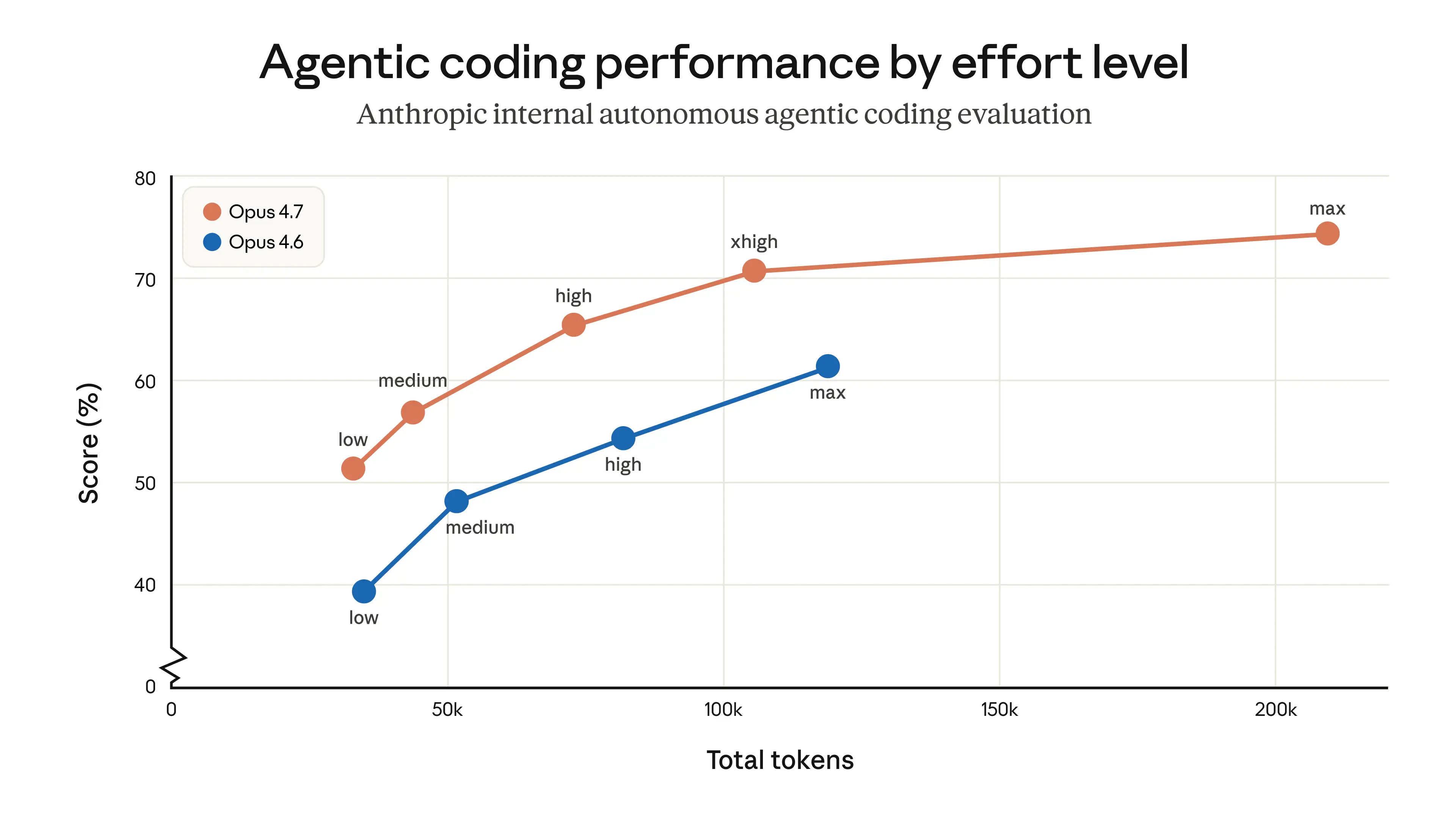
全新的 xhigh 等級介於 high 和 max 之間,專為程式撰寫與 Agent 任務設計,在能力與效率之間取得更好的平衡。
low ── medium ── high ── xhigh ★NEW ── max
✦ 思考內容預設為隱藏
在串流回應中,思考過程不再預設顯示。若要取得推理摘要,請在請求中明確傳入 display 欄位:
| display 值 | Opus 4.7 | Opus 4.6 | 行為 |
|---|---|---|---|
| ”omitted” | 預設 | 非預設 | 思考區塊內容為空 |
| ”summarized” | 必須手動設定 | 預設 | 回傳思考摘要文字 |
"reasoning": {
  "effort": "xhigh",
  "display": "summarized"
}
圖:Opus 4.7 全新 xhigh 等級 — Agent 程式撰寫效能比較(來源:Anthropic 官方)
2. Claude 原生 API 參考
Anthropic 原生 API 的 effort 值與官方規格一致:
| effort 值 | 支援的模型 | 說明 | 建議使用情境 |
|---|---|---|---|
| low | 所有支援的模型 | 大幅節省 token,能力僅適度降低 | 簡單任務、高併發請求、子 Agent |
| medium | 所有支援的模型 | 平衡模式,適度節省 token | 一般 Agent 任務 |
| high | 所有支援的模型 | 預設值;高效能表現 | 複雜推理、程式撰寫、Agent 任務 |
| xhigh(新增) | 僅限 Opus 4.7 | 能力介於 high 與 max 之間;擅長長期任務 | 建議作為程式撰寫與 Agent 任務的起始設定 |
| max | Opus 系列 | 最高能力 | 前沿研究問題 |
AIHubmix Claude 原生 API — Opus 4.7 範例
from anthropic import Anthropic

client = Anthropic(
    api_key="<AIHUBMIX_API_KEY>",
    base_url="https://aihubmix.com"
)

response = client.messages.create(
    model="claude-opus-4-7",
    max_tokens=16000,
    thinking={"type": "adaptive"},
    output_config={"effort": "xhigh"},  # Options: low / medium / high / xhigh / max
    messages=[
        {
            "role": "user",
            "content": "A snail is at the bottom of a 10-meter well. Each day it climbs 3 meters, but each night it slides back 2 meters. How many days does it take to reach the top?"
        }
    ]
)

print(response.content[-1].text)
3. AIHubmix Chat 統一介面的推理強度支援
AIHubMix Chat 統一介面遵循 OpenAI 規格,並透過 reasoning.effort 控制推理強度。不同的 Claude 模型會自動對應至相應的強度等級:
reasoning_effort (Claude 模型的推理強度控制)
| effort 值 | Opus >=4.7(新增) | Opus 4.6 / 4.5 | Sonnet 4.6 |
|---|---|---|---|
| minimal | low | low | low |
| medium | medium | medium | medium |
| high | high | high | high |
| xhigh | xhigh | max | high |
| max | max | max | high |
注意: xhigh 僅 Opus 4.7 原生支援。其他 Opus 模型會自動退回 max,Sonnet 系列則會退回 high。
Chat 統一介面 — Opus 4.7 範例
from openai import OpenAI

client = OpenAI(
    base_url="https://aihubmix.com/v1",
    api_key="<AIHUBMIX_API_KEY>",
)

completion = client.chat.completions.create(
    model="claude-opus-4-7",
    # max_tokens=10000,  # Default is 4096; enable for longer outputs
    messages=[
        {
            "role": "user",
            "content": "A snail is at the bottom of a 10-meter well. Each day it climbs 3 meters, but each night it slides back 2 meters. How many days does it take to reach the top?"
        }
    ],
    extra_body={
        "reasoning": {"effort": "xhigh"}
    }
)

print(completion.choices[0].message.content)
4. 在 Chat 統一介面中控制思考內容
在 OpenAI 相容介面中,reasoning 支援 display 欄位,可控制是否回傳思考摘要。Claude Opus 4.7 預設不會回傳思考內容。設定 "display": "summarized" 即可啟用。
| 欄位 | 值 | 說明 |
|---|---|---|
display | (省略) | 不回傳思考內容(預設) |
display | "summarized" | 回傳思考摘要 |
Opus 4.7 — 思考摘要範例
from openai import OpenAI

client = OpenAI(
    base_url="https://aihubmix.com/v1",
    api_key="<AIHUBMIX_API_KEY>",
)

completion = client.chat.completions.create(
    model="claude-opus-4-7",
    messages=[
        {
            "role": "user",
            "content": "A snail is at the bottom of a 10-meter well. Each day it climbs 3 meters, but each night it slides back 2 meters. How many days does it take to reach the top?"
        }
    ],
    extra_body={
        "reasoning": {"effort": "xhigh", "display": "summarized"}
    }
)

print(completion.choices[0].message.content)
如需進一步了解,請參閱 AIHubmix 文件或 Anthropic 官方文件。
最後更新:2026-06-01