With one clear product image, Claude Code, and the AIHubMix API, you can generate character references in Seedream, register them as virtual-person assets, and use Seedance to create an AI product ad.
This tutorial is based on a real aloe-mist campaign and includes the project structure, configuration, commands, and complete video prompt. The target output is a 20-second, 720p, 9:16 vertical ad with an AI-generated person and setting.
Claude Code and AIHubMix power the full workflow. Claude Code reads the project brief, revises prompts, and organizes execution. AIHubMix provides one model entry point so image and video generation can operate inside the same project.
Model IDs, parameters, and error handling come from a project snapshot dated September 16, 2026. Check the current API before reusing them. Commands use the included flow.py and must be run from the project root.Download the Complete Starter
Download the code, prompts, configuration, and sample images:
https://drive.google.com/uc?export=download&id=1nXcj26Fq3daHeTd0SynS7_QEXgH8z4u_
After extracting it, enter the seedance-starter directory. The package includes flow.py, two schema snapshots, five prompt files, the product image, and three reference images. The Python script uses only the standard library.
- Start with the video stage: use the three included references, configure your key, and begin with Step 4.
- Start with your own product: replace the product image and prompt details, move the included reference images out of
assets/, and begin with Step 3.
Copy .env.example to .env and add your own API key. Your account needs access to the relevant models, any required asynchronous-task permission, and sufficient quota. API generation incurs usage charges.
1. Prepare the Product Image and Project
The example product is Nature Republic Aloe Vera Mist. When adapting the workflow, update the image, product description, and use action together.
| File | Purpose |
|---|---|
assets/product.png | Original product image |
prompts/prompt-a.txt | Main character portrait prompt |
prompts/prompt-b.txt | Character-holding-product prompt |
prompts/prompt-c.txt | Product-use prompt |
prompts/prompt-video.txt | Video timeline, camera, and audio requirements |
prompts.json | Dimensions, duration, reference dependencies, and prompt paths |
flow.py | API requests, asset registration, polling, and downloads |
seedream.schema.json, seedance.schema.json | Cached API schema snapshots |
Claude Code helps read the project brief and revise configuration and prompts. flow.py sends the actual requests through AIHubMix.
Why AIHubMix Fits This Workflow
An AI product-ad workflow usually needs more than one model. An image model creates the person and product references; a video model creates movement and camera behavior. AIHubMix covers most mainstream models, so you can select models by task through one API service instead of maintaining separate accounts, authentication, and request entry points for every provider.
AIHubMix also connects to multiple suppliers and automatically selects an available low-latency route. This can reduce the effect of a single supplier's instability on a workflow that must complete image generation, asset processing, and video generation in sequence. Model availability, routing, and response time still depend on current service conditions.
Create .env in the project root, or provide the same variable in your environment:
AIHUBMIX_API_KEY=replace_with_your_api_key
The project excludes .env through .gitignore. Share only the variable name and example, never the real key.
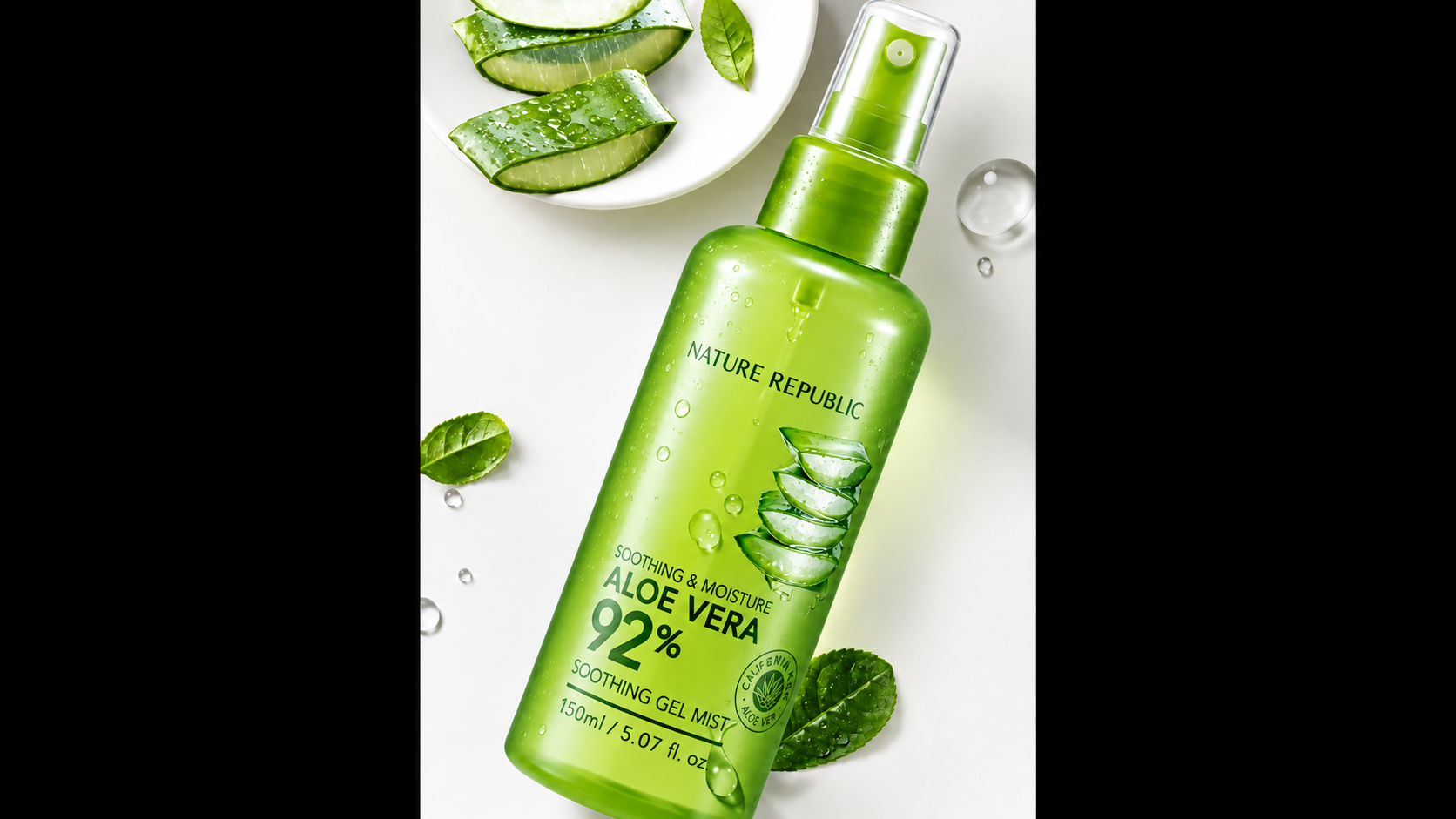
The entire workflow begins with one clear product image.
2. Set the Output Target and Separate Image from Video Parameters
The relevant part of prompts.json looks like this. Keep the existing stills array and other fields when editing the real file.
{
  "size": "1080x1920",
  "aspect_ratio": "9:16",
  "duration": 20,
  "resolution": "720p",
  "generate_audio": true,
  "video_prompt_file": "prompts/prompt-video.txt"
}
size belongs to image generation. aspect_ratio, duration, resolution, and generate_audio belong to video generation. The script builds separate requests rather than sending the entire configuration object to both endpoints.
The project uses these model IDs:
- Seedream:
doubao-seedream-5-0-pro-260628 - Seedance:
doubao-seedance-2-5-260628
The bundled schema snapshots show that the image endpoint accepts size, while the video endpoint accepts aspect_ratio. Mixing them causes a rejection. flow.py checks cached schema properties before sending a request, but this is not complete parameter validation.
3. Generate the Three Character References in Order
Each image has a different role, and later images depend on earlier ones:
| Reference | Content | Inputs |
|---|---|---|
| A: Character portrait | Establish face, hair, wardrobe, room, and lighting | Text prompt only in this example |
| B: Holding the product | The same person holds the bottle with the label facing camera | Product image + A |
| C: Using the product | The same person presses the spray pump | Product image + B |
The prompts repeat character details and describe the product's shape, colors, label layout, and natural handling.
Run:
python3 flow.py stills
The results are saved as assets/frame-01.jpg, frame-02.jpg, and frame-03.jpg. Review character consistency, packaging fidelity, and the realism of the use action.
The script skips existing files. If you change a prompt, back up and move the corresponding output before rerunning. Changing A may also require regenerating B and C.
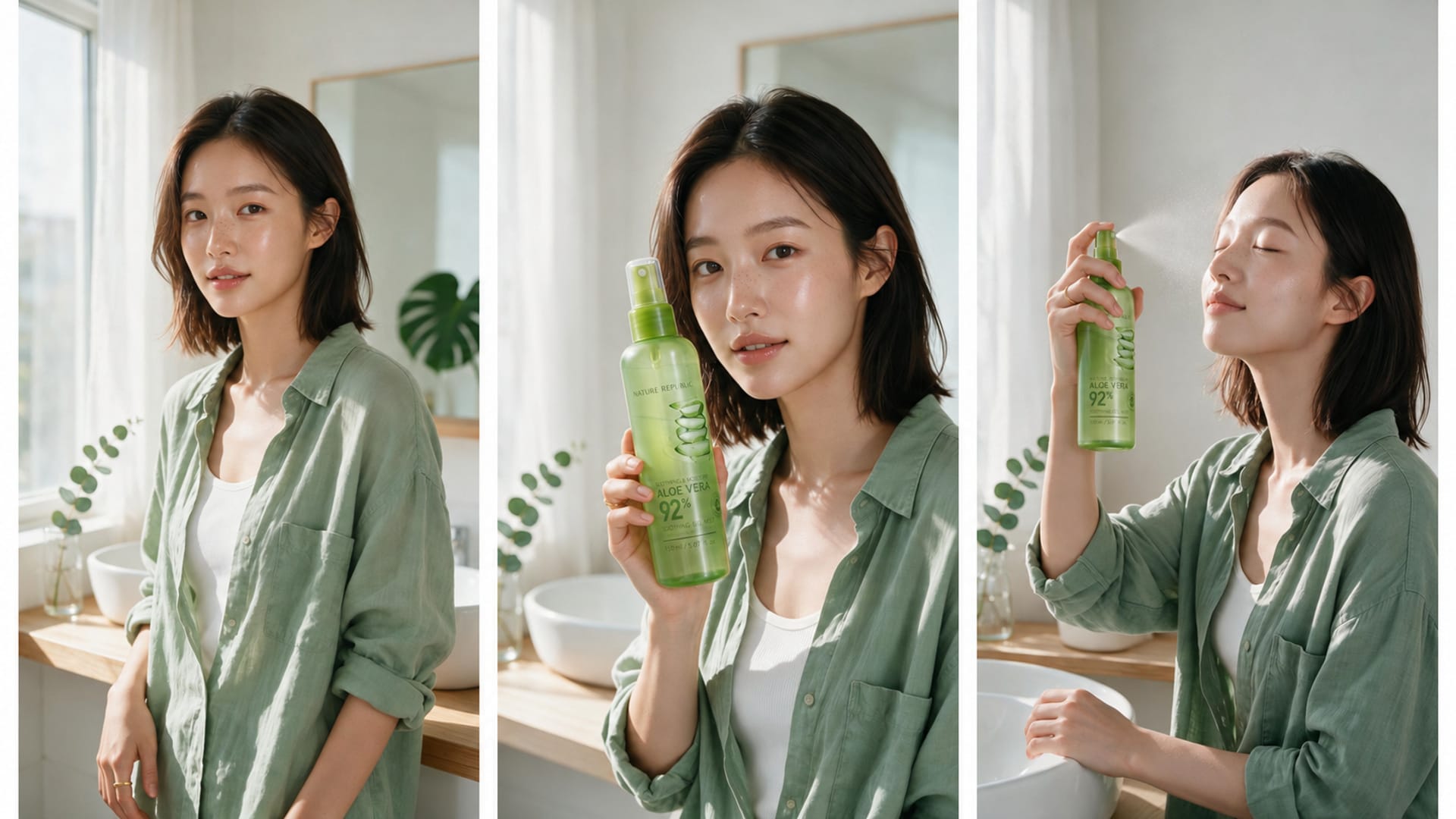
The references establish character identity, product presentation, and product use.
4. Host the Images and Register Virtual-Portrait Assets
The starter contains no asset ID from the author's account. Register the references in your own account.
This project uses public image URLs for registration. The source workflow used GitHub raw URLs pinned to a commit SHA, but any hosting that returns the image directly without authentication can work.
A GitHub /blob/ URL returns an HTML page and cannot be used as an image URL.
Replace this placeholder host with the real location of your uploaded files:
IMAGE_BASE='https://your-public-image-host.example/campaign'
python3 flow.py check "$IMAGE_BASE/frame-01.jpg" "$IMAGE_BASE/frame-02.jpg" "$IMAGE_BASE/frame-03.jpg"
python3 flow.py assets "$IMAGE_BASE/frame-01.jpg" "$IMAGE_BASE/frame-02.jpg" "$IMAGE_BASE/frame-03.jpg"
check verifies HTTP 200 and an image Content-Type. assets creates or reuses a virtual_portrait asset group, registers each image, waits until it becomes active, and writes the asset IDs to state.json.
This step comes from an actual failure in the project: passing photorealistic character URLs directly to the video endpoint returned doubao_real_person_required. The person in this campaign was AI-generated, so virtual_portrait was the correct classification. A real-person photograph must follow the corresponding verification process and must not be labeled as virtual.
All assets used in one video request should belong to the same group.
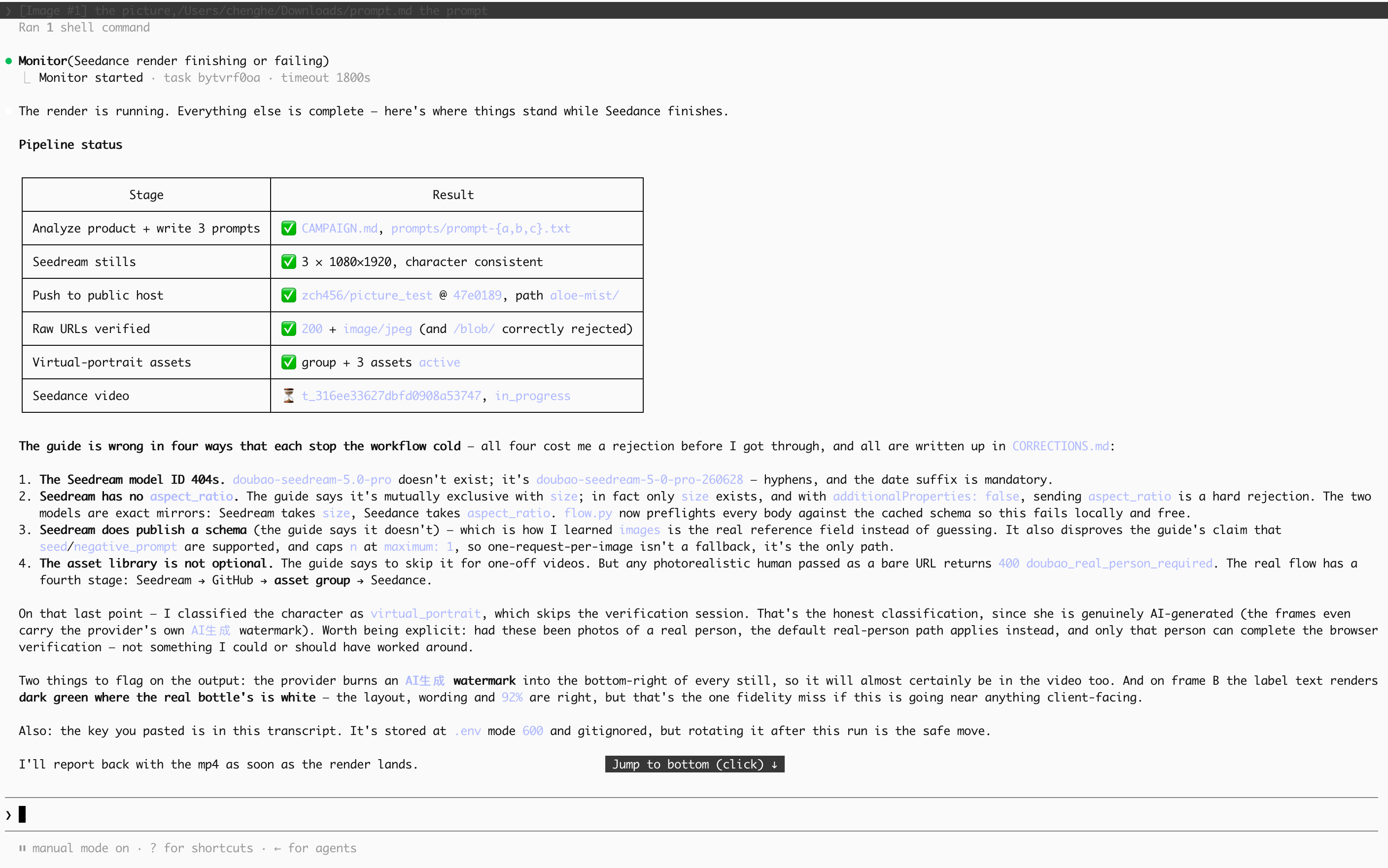
The references were generated and all three assets were active; the video task was still running when this screenshot was captured.
5. Write the Video Prompt as a Timeline with Camera Limits
The final project prompt divides one continuous 20-second shot into four phases:
| Time | Character action | Product position |
|---|---|---|
| 0–5 seconds | Looks at camera and presents the bottle | Beside her face, label toward camera |
| 5–10 seconds | Raises the bottle and presses the pump | Remains inside the frame |
| 10–15 seconds | Closes her eyes and feels the mist settle | Lower third of the frame |
| 15–20 seconds | Opens her eyes and presents the product again | Back beside her face, label toward camera |
An earlier result pushed the camera too close and lost the product. The final prompt therefore limits the move to a mid-close shot, requires the product to stay visible, and asks for a legible label during the first and last three seconds.
Here is the complete prompts/prompt-video.txt. For another product, update the brand, packaging description, and use action. These instructions are generation targets and still require output review.
One continuous 20-second vertical beauty commercial take, no cuts, in a sunlit minimalist vanity corner.

0-5s: the same 24-year-old East Asian woman in an oversized sage-green linen shirt over a white ribbed tank top stands at the vanity holding the translucent light-green Nature Republic Aloe Vera 92% Soothing Gel Mist beside her cheek, the label facing camera and fully legible. She looks to camera with a warm, easy smile and turns the bottle slightly so the label catches the morning light.

5-10s: she lifts the bottle just above eye level and presses the fine-mist pump. A soft cone of aloe mist sprays across her face and catches the light as a faint sparkle of micro-droplets.

10-15s: her eyes close and her chin lifts into a small contented smile as the mist settles, tiny droplets resting on her cheekbone and brow. The bottle stays visible in the lower third of the frame throughout this beat.

15-20s: she opens her eyes, brings the bottle back up beside her cheek with the label square to camera, and holds a final calm look at the lens.

Camera: one slow, smooth push-in from a chest-up framing to a mid-close framing ONLY. Do not push past a mid-close shot. The product must stay inside the frame for the entire take, and the label must be clearly legible in both the first three seconds and the last three seconds.

Look: soft diffused morning sunlight from camera left, photorealistic skin texture with real moisture on the skin, mist rendered as genuinely photographed spray rather than digital particles, premium K-beauty advertising. Keep the product packaging, colours, materials, label layout and label text exactly as in the reference images; do not redesign or re-letter the product. No text overlays, no captions, no watermarks.

Audio: a quiet bright room, one soft short pump-spray hiss, a gentle breath. No music, no voiceover.
Audio generation is enabled, but the prompt requests only room tone, one spray sound, and a gentle breath—no music or voice-over.
6. Generate and Save the Video
After asset registration, submit asset:// references. This command reads the saved IDs and passes each one as a separate argument:
python3 - <<'PYCODE'
import json
import subprocess
import sys
from pathlib import Path

state = json.loads(Path("state.json").read_text())
refs = ["asset://" + asset_id for asset_id in state["asset_ids"]]
subprocess.run([sys.executable, "flow.py", "video", *refs], check=True)
PYCODE
Using an argument list also avoids a zsh issue from the source project, where several IDs stored in one plain string could reach the script as one invalid argument.
The script saves the video task ID, polls until completed, and downloads the output to out/video.mp4. Another download can overwrite that path, so back up versions you want to compare.
Resume an existing task or re-download its result with:
python3 flow.py status
If the create response was lost, list recent tasks and resume the relevant ID:
python3 flow.py tasks
python3 flow.py status VIDEO_TASK_ID
Looking for an existing task before creating another one prevents accidental duplicate generation.
7. Review the Output and Iterate
The source project keeps video-v1-10s.mp4 and the final video.mp4. The first version lasted only 10 seconds and did not show enough product use, so the workflow went through a second prompt iteration.
Review every result against this checklist:
- [ ] Duration, resolution, and aspect ratio match the target.
- [ ] The character's face, wardrobe, and setting remain consistent.
- [ ] The product stays visible and its label can be read at the beginning and end.
- [ ] Handling and spray actions match the product's real use.
- [ ] Bottle shape, packaging, and text do not change noticeably.
- [ ] The camera does not move too close, and the audio matches the request.
If duration is wrong, inspect both configuration and the actual request. If the product leaves the frame, strengthen camera limits. If the use action is too short, allocate time and behavior more explicitly. Editing only prompts/prompt-video.txt does not require regenerating reference images; regenerate and register them only when the visual references must change.
Frequently Asked Questions
Why does a model name that looks correct return 404?
The shortened Seedream name returned model_not_found in the source project. Use the complete API model ID accepted by the current endpoint rather than assuming that the marketing display name is also the API identifier.
Why can I open an image in my browser but still fail to register it?
Confirm that the URL returns the image itself rather than HTML, a share page, or a sign-in page. Use python3 flow.py check URL... before registration.
Why did changing a prompt not change the reference image?
stills skips existing files. Back up and move any image that needs regeneration, then check whether downstream references should also be regenerated.
Does HTTP 200 mean the video is finished?
No. The script branches on the task's status and downloads only after the task reaches completed.
Start Your First Version
Prepare one product image, configure AIHubMix access, and choose the image and video models. Then let Claude Code adapt the product description and prompts. Generate the three references, review and register them, create the video, and use the checklist to decide the next iteration.
When a future project needs another model, keep the same file structure and workflow, then update the AIHubMix model selection and model-specific parameters. That is the practical value of a unified API service for a content team using several AI models: models can change by task while the workflow remains reusable.