AIHubMix now has a Halloween photo gallery: 24 ready-made looks in six groups, each with a sample image and its full prompt. Pick one, choose Create this look, and the AIHubMix Playground opens with the model, a 3:4 portrait size and the prompt already filled in. You add your own photo and send it.
Browsing the looks and copying the prompts costs nothing. Each generation is billed at the price of the model you pick. With the default model, GPT Image 2.5 Flare, our 24 sample images came to about $0.17 each.
What's in the gallery
The looks are grouped by who, or what, is in the picture, because each group needs a different reference photo. Couples can upload one photo of both people or two single portraits.
| Group | What you upload | One look from the group |
|---|---|---|
| Halloween costumes | One portrait | A velvet cape over everyday clothes |
| Fun selfies | One portrait | Ghosts lined up at the front door |
| Couples | One or two photos | Vampire and witch at a party |
| Pets | One pet photo | A cat stealing a mini pumpkin |
| Shops & marketing | Shopfront or product | Pumpkin lanterns on a shopfront |
| No-photo scenes | Nothing | Ghosts tumbling in a laundromat |
Most looks put one costume piece into a bright, real place: a street at golden hour, a party kitchen, a porch with pumpkins. That keeps the result reading like a photo someone took, not a costume render. The gallery and every prompt are available in 16 languages.
Four looks, before and after
All the people, pets and shops below are fictional: the "before" photos were generated too, then run through the same prompts you get in the gallery.
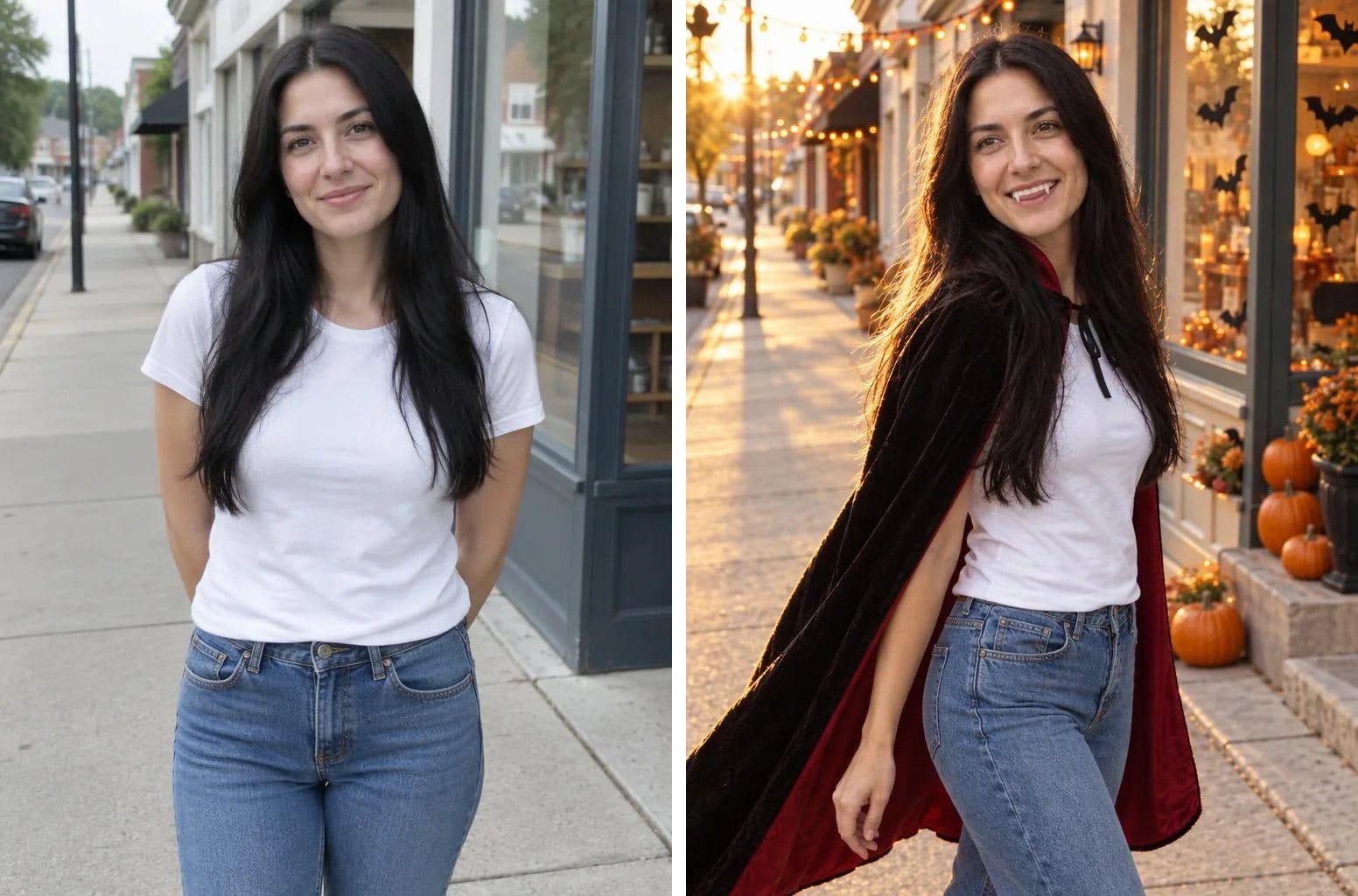
Velvet Vampire, Golden-Hour Walk. The outfit stays; a cape and fangs are added.
The costume prompts keep your own clothes and add one or two pieces. Every prompt that uses a portrait also tells the model to keep your face shape, facial proportions, hairline, skin tone and apparent age, and not to beautify or swap the face. That clause is what makes the result look like you rather than a stranger in a cape.
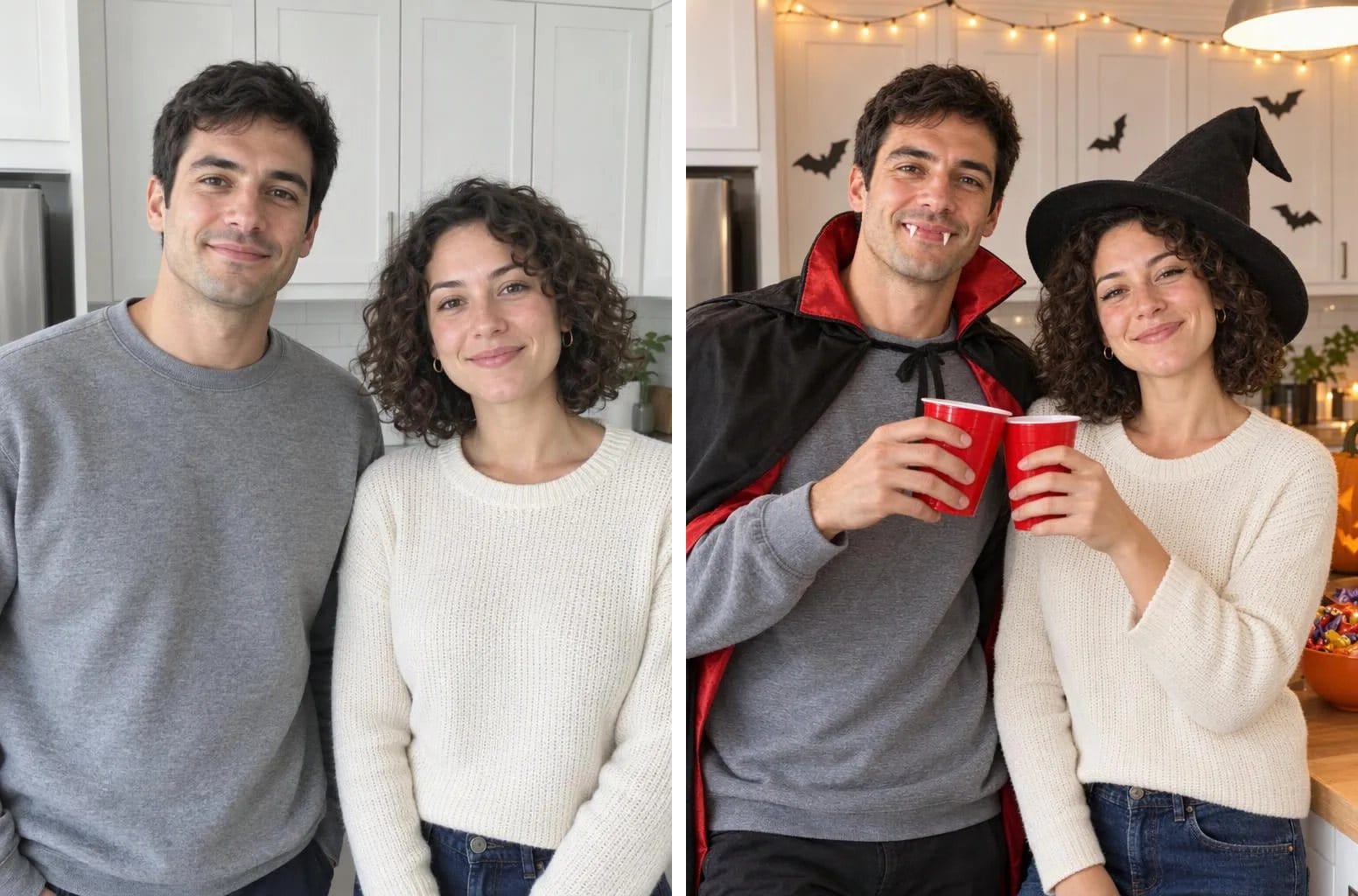
Party Kitchen, String Lights On. One photo of two people, each with their own costume.
Two-person photos are where faces most often get blended or swapped. The couple prompts call the person on the left A and the person on the right B (or photo 1 and photo 2 if you upload two portraits), give each one their own costume, and tell the model not to blend features or swap identities.
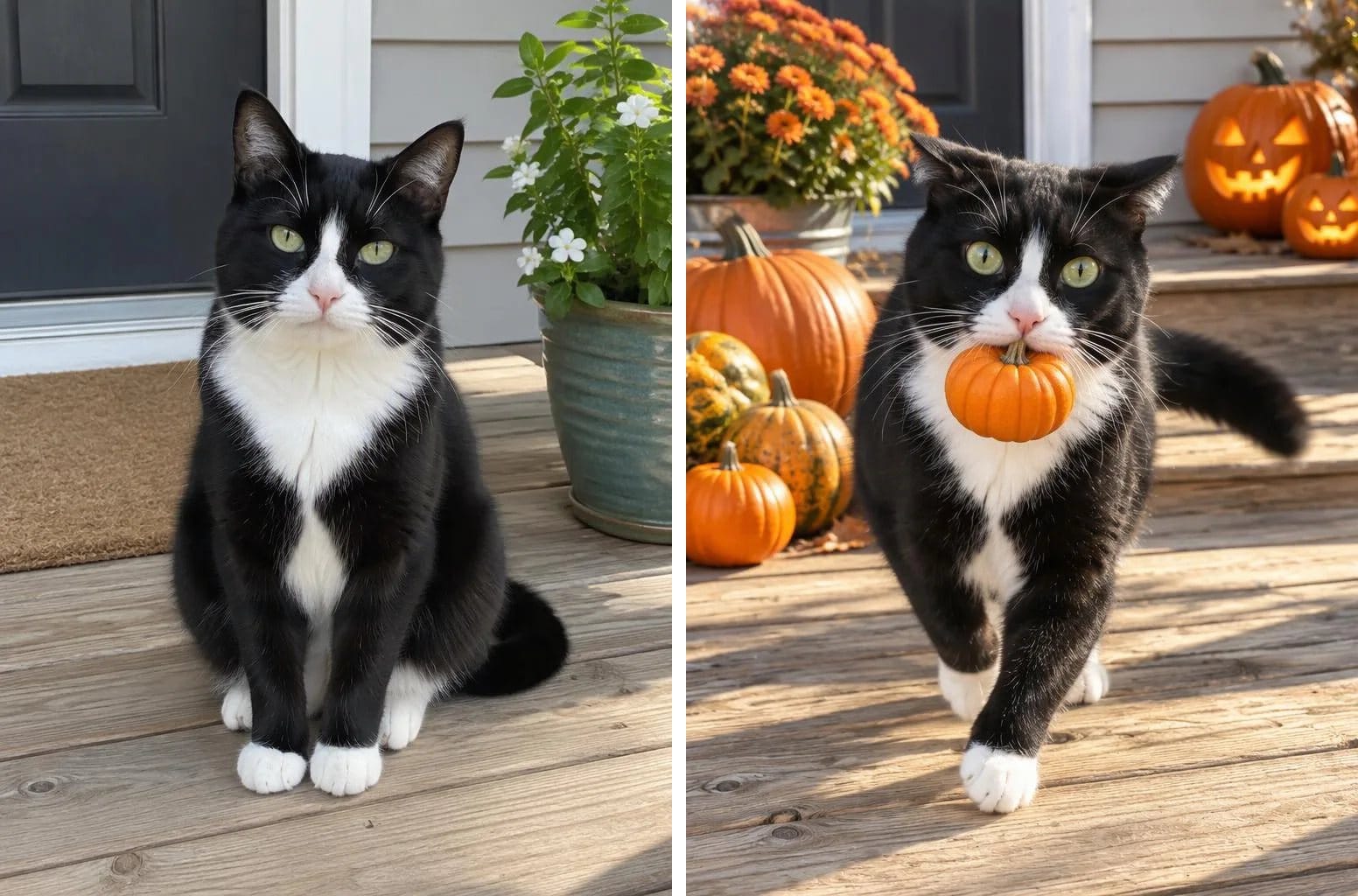
Caught Red-Pawed: The Pumpkin Thief. Same markings, same eye colour.
Pet prompts keep the breed, body shape, coat colour, markings and eye colour, then add one prop or a light costume that never covers the face. They also rule out extra paws, legs and tails.
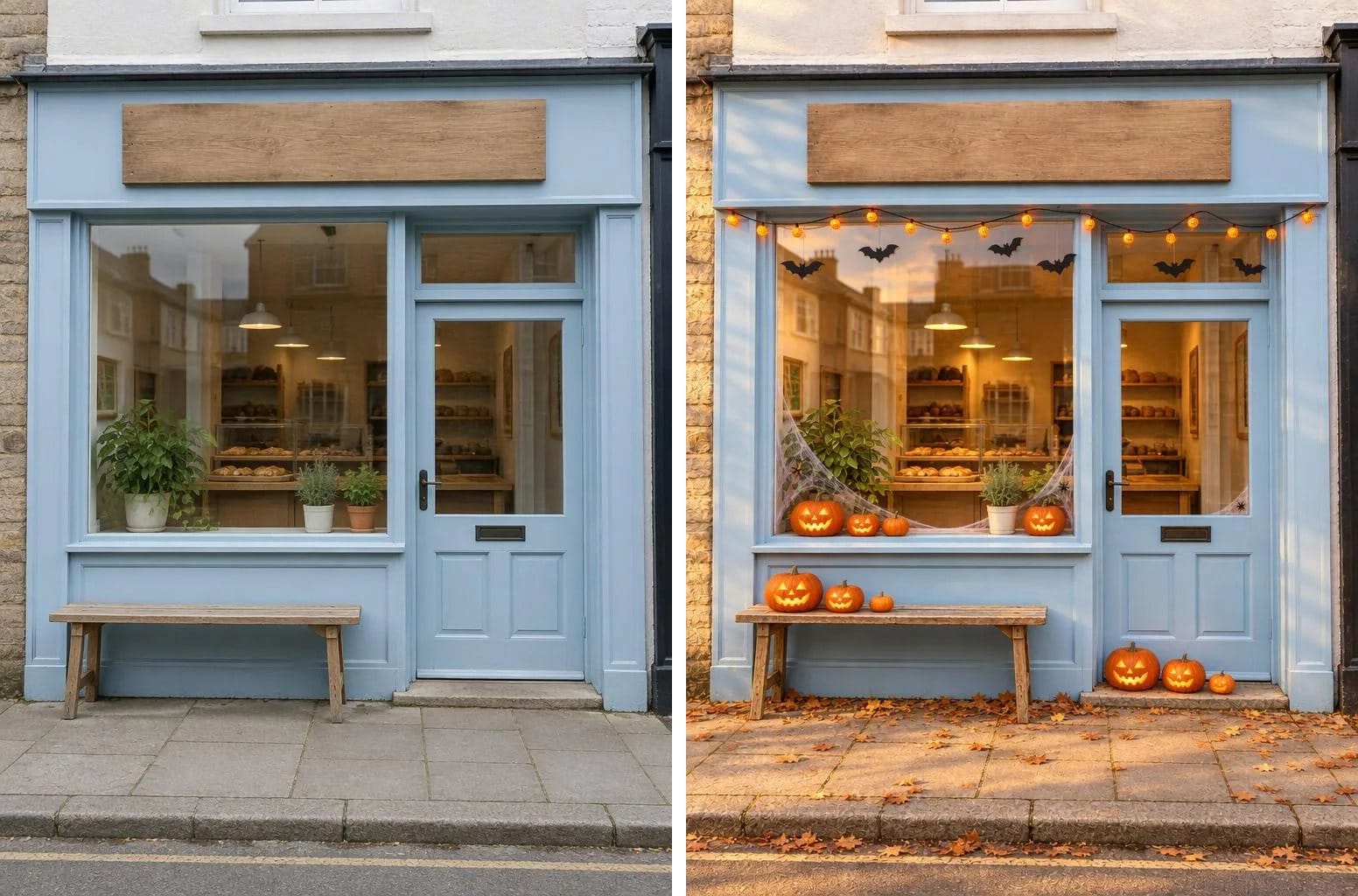
Storefront Makeover for Halloween. The sign and layout stay as they are.
The shop looks are for small businesses: preview decorations on your real storefront before buying them, or make a seasonal hero image for a product page. The storefront prompts keep the building, windows, colours and signs from the same camera angle and only add decorations; the product prompts keep the shape, colours, label and any printed text.
How to make one with your own photo
- Sign in to AIHubMix first. This order matters: if you open a look while signed out and sign in afterwards, you land on the dashboard, and the model and prompt aren't carried over.
- Pick a look in the gallery and open it to see the full prompt and the photo it needs.
- Choose Create this look. The AIHubMix Playground opens in a new tab with everything filled in. Nothing is generated yet.
- Upload your photo, check the model and the cost, then send.
A clear, front-facing photo in even light works best. Waist-up framing keeps more likeness than a full-body shot, where the face ends up small. If the first result misses, change one thing at a time. The prompt guide walks through six full prompts and what to change when a result goes wrong.
Which model to use
Every look opens with GPT Image 2.5 Flare. You can switch to two other models on AIHubMix that also take a reference photo; the link carries the right size setting for each.
| Model | Good for | Price on the model page |
|---|---|---|
| GPT Image 2.5 Flare | The default for every look | $0.165 per image |
| Gemini Nano Banana 2.1 | Refining over several turns | $30 per 1M image output tokens |
| Qwen Image 3.0 | Cheap test runs | $0.025 per image |
The GPT Image 2.5 Flare price is for a 1024×1536 image at auto quality; see the GPT Image 2.5 Flare model page for other sizes. Qwen Image 3.0 adds $0.003 per input image. The Playground shows the cost before you send.
Privacy and a few rules
- No photos of children. AIHubMix is for adult users and businesses and doesn't collect personal data from minors. The default model's moderation also blocks realistic images of children.
- Your photo isn't kept by AIHubMix by default. Under the AIHubMix Privacy Policy, request and response content isn't retained; only metadata such as IP address, model name, request time and usage is. Your photo goes to the provider that serves the model you chose, under that provider's own policy; the provider data policies list the differences.
- Label the result. Many platforms have an AI-generated label; use it when you post. Where there's none, say so in the caption.
Building your own Halloween photo feature
The prompts work through the API too. Send one to the AIHubMix image endpoint and pass the reference photo in images:
curl https://aihubmix.com/ai/v1/images/generations \
  -H "Authorization: Bearer $AIHUBMIX_API_KEY" \
  -H "Content-Type: application/json" \
  -d '{
    "model": "gpt-image-2.5-flare",
    "prompt": "<a prompt from the gallery>",
    "images": ["https://example.com/your-photo.jpg"],
    "size": "1152x1536"
  }'
Downloading a result URL needs the same Authorization header, and in our runs the URLs stopped working after about 30 minutes, so save the image on your side. Parameters for each model are in the image generation API docs.
FAQ
Are the Halloween templates free?
Browsing the samples and copying every prompt is free. Generating an image is billed at the price of the model you choose, shown on its model page and in the Playground before you send.
Do I need an AIHubMix account?
Yes. The Playground needs one. Sign in before you choose Create this look, so the model and prompt carry over.
Will the result look exactly like me?
Not guaranteed. Every prompt asks the model to keep your face shape, features and apparent age, but likeness depends on the model and the photo. A clear, front-facing, waist-up photo in even light gives the model the most to work with.
Can I make Halloween photos of my kids?
No. AIHubMix is only for adult users and businesses, and the default model blocks realistic images of children. Please don't upload photos of children.
Will my uploaded photo be stored?
Not by AIHubMix by default; it keeps only request metadata. The photo is sent to the provider of the model you chose, which handles it under its own data policy.
Can I use the prompts in other tools?
Yes. A prompt is plain text, so it works with any image model on AIHubMix that accepts a reference photo, or in another tool. Sizes and parameter names differ, so check that tool's docs.
Which language should my prompt be in?
Whichever you're most comfortable editing. Each of the 16 language versions keeps the same scene and constraints. If a result misses, trying another language version sometimes helps.